[ANN] UPDATE: The Safex Mine v1.1.0 — Public Windows Release + Multilanguage Options

UPDATE — 6 October 2026: The multilingual The Safex Mine v1.1.0 release is now available, together with the new multilingual project website.

Website: The Safex Mine
Download v1.1.0: Release The Safex Mine v1.1.0 — Multilingual Windows Release · aussiesloth/the-safex-mine · GitHub

The original v1.0.0 announcement and translation-review material below is retained for historical context. Superseded material has been struck through.

I’d like to introduce The Safex Mine, a community-developed Windows desktop application for solo mining Safex Cash (SFX). It provides a graphical way to mine without having to configure and manage XMRig manually from the command line.

Version 1.0.0 was publicly released on 18 September 2026 and is already in use. The published Windows x64 installer and checksum file are available here:

~~Download v1.0.0: ~~Release The Safex Mine v1.0.0 · aussiesloth/the-safex-mine · GitHub
Source repository: GitHub - aussiesloth/the-safex-mine: Safex Cash solo-mining desktop application · GitHub
Windows Installation Guide: the-safex-mine/docs/WINDOWS_INSTALLATION.md at main · aussiesloth/the-safex-mine · GitHub

(The multilingual work described below is for a future update.)

What it does

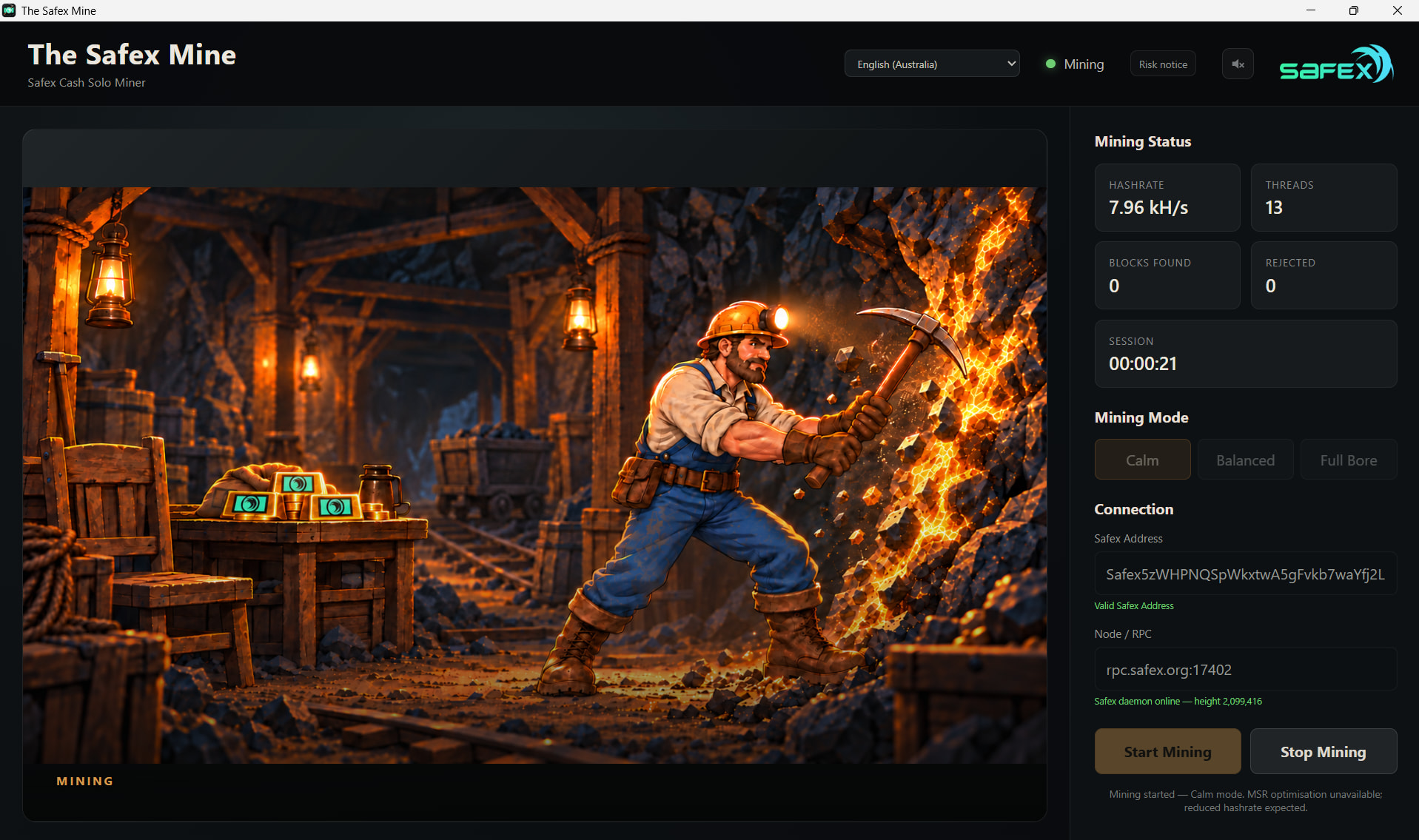
  • Safex Cash solo mining through a Safex-compatible XMRig backend (rx/sfx).
  • Three CPU modes: Calm, Balanced and Full Bore.
  • Uses the public node (rpc.safex.org:17402) by default, or a custom/LAN node if preferred.
  • Displays live hashrate, thread count, session time, found blocks and rejected results.
  • Detects daemon disconnections and attempts automatic recovery.
  • Uses a standard-user graphical interface; only a narrowly scoped mining helper requests elevated Windows privileges for the mining backend/MSR setup.
  • Five visual mining states and a short cash-register-style chime when an actual block is found.
  • A first-run Mining Risk Acknowledgement, which can subsequently be reopened from the application.

The published v1.0.0 installer is unsigned and includes a CPU-mining backend and WinRing driver, so antivirus or SmartScreen warnings may (will definitely) occur. Obtain the installer only from the GitHub release above, verify its SHA-256 using SHA256SUMS.txt before executing it, and consult the Windows Installation Guide.

The current Windows release remains unsigned and includes a CPU-mining backend and WinRing driver, so antivirus or SmartScreen warnings may occur. Obtain the installer only from the official GitHub release, verify its published SHA-256 before executing it, and consult the Windows Installation Guide.

CTA: Help review the next multilingual update

Alongside the already released English-language v1.0.0, we have been preparing a multilingual interface and translated Mining Risk Acknowledgement for a future version. Before merging AI-assisted translations of important warnings, I would really appreciate native-speaker feedback.

The proposed initial scope is English plus 22 translated locales. Draft bilingual Risk Acknowledgement review packs are available for:

German (Deutsch), Spanish (Español), French (Français), Italian (Italiano), Dutch (Nederlands), Polish (Polski), Portuguese (Brasil), Portuguese (Portugal), Russian (Русский), Ukrainian (Українська), Turkish (Türkçe), Indonesian (Bahasa Indonesia), Vietnamese (Tiếng Việt), Simplified Chinese (简体中文), Japanese (日本語), Korean (한국어), Hindi (हिन्दी), Bengali (বাংলা), Arabic (العربية), Persian (فارسی), Urdu (اردو), and Serbian Latin (Srpski).

A Serbian community member has already suggested improving the Serbian and English GPL wording, and this proposed clarification is included consistently across the refreshed review packs, with the English source printed alongside each translation.

If you can help: Please download the pack for your language, listed below. Check whether each paragraph conveys substantially the same meaning and strength as the English, reads naturally, and uses appropriate local mining terminology. Please pay particular attention to hardware/warranty warnings, Windows security wording, liability clauses and the paragraph protecting non-excludable statutory rights. You do not need to be a lawyer; simply flag anything that seems unclear, awkward or stronger/weaker than the English.

For suggested corrections, reply here giving the language, clause number, preferred full replacement wording and, if useful, a short reason. Even checking one section is helpful; please say which clauses you reviewed and your language/region.

Review files: I’ll add them separately to this post.

Thank you to everyone already using the miner, and to anyone able to help improve the next release. Suggestions about the application itself are welcome too.

2 Likes

@aussiesloth this is clever, I’d say launch it with the translations you have, and if they need updating they’ll get updated in time.?

Also, would be cool to have a dedicated page perhaps hosted on github pages along with it

1 Like

Thanks Dan! I think that’s a sensible approach.

We’ve only had one suggested translation correction so far, from @galicone, and it was actually an improvement to the canonical English wording as well.

I’ll proceed with getting the completed pilot languages into the next release, and we can continue incorporating community corrections and adding further languages as they’re completed.

I really like the GitHub Pages suggestion too. A dedicated landing page with the latest download, installation information, screenshots, source links and translation status would be a nice addition.

Thanks for the encouragement!

1 Like

The Safex Mine v1.1.0 — Multilingual release + new project website

A fairly substantial update since the original v1.0.0 release. :slightly_smiling_face:

The Safex Mine v1.1.0 is now available for Windows x64, with the main focus of this release being localisation and making the application much easier to use outside English-speaking Windows installations.

The application now supports English (Australia) plus 23 translated languages/locales across the main UI, status/accessibility text and the Mining Risk Acknowledgement.

  • Bengali — বাংলা
  • Chinese (Simplified) — 简体中文
  • Dutch — Nederlands
  • Filipino — Filipino
  • French — Français
  • German — Deutsch
  • Greek — Ελληνικά
  • Hindi — हिन्दी
  • Hungarian — Magyar
  • Indonesian — Bahasa Indonesia
  • Italian — Italiano
  • Japanese — 日本語
  • Korean — 한국어
  • Polish — Polski
  • Portuguese (Brazil) — Português (Brasil)
  • Portuguese (Portugal) — Português (Portugal)
  • Russian — Русский
  • Serbian (Latin script) — Srpski
  • Slovenian — Slovenščina
  • Spanish — Español
  • Turkish — Türkçe
  • Ukrainian — Українська
  • Vietnamese — Tiếng Việt

Windows will automatically try to select the best supported language from the user’s preferred Windows languages, or the language can be changed manually and remembered by the app. The language can also be selected before accepting the first-run Mining Risk Acknowledgement.

The single Windows installer is multilingual as well, with 22 installer languages in total. Filipino and Bengali currently use the English installer UI, but both still receive the fully translated application and translated installation/first-use documentation.

We have also published 23 translated Windows installation guides, covering the important first-use information around SmartScreen, Microsoft Defender, checksum verification and the narrowly scoped antivirus exclusion process if one is required.

New multilingual project website

I’ve also put together a small public site for The Safex Mine:

The website supports the same 24 release-enabled application languages, automatically follows the visitor’s browser language where possible, and provides:

  • the current Windows download and SHA-256 information;
  • screenshots and an overview of the miner;
  • the three CPU modes — Calm, Balanced and Full Bore;
  • installation/security guidance;
  • direct access to the appropriate translated Windows installation guide;
  • links back to the public source repository and project documentation.

The site is deliberately simple and static — no analytics, advertising, tracking, external fonts or third-party JavaScript.

What hasn’t changed

v1.1.0 does not change the underlying mining model established in v1.0.0.

It is still a Windows desktop Safex Cash solo miner using the Safex-compatible XMRig backend, with the standard-user GUI / narrowly scoped elevated-helper model for XMRig and MSR optimisation.

The default public daemon remains:

rpc.safex.org:17402

Custom/LAN nodes are still supported.

Windows security reminder

The Safex Mine remains an unsigned Windows application.

Because it contains a CPU miner, elevated helper and WinRing driver, SmartScreen or antivirus products may warn about or quarantine the installer or mining components.

Please download it only from the official GitHub release and verify the supplied SHA-256 checksum before running the installer.

If Defender quarantines the installer immediately after download, the tested process is to restore/allow that specific installer, verify its SHA-256 against the published checksum, and only then run it. There is no need to disable Defender or create broad exclusions.

Download

The Safex Mine v1.1.0

Installer:

The-Safex-Mine_1.1.0_x64-setup.exe

SHA-256:

DB13AB3CF3D1A9B34AE291A5F3643C32C8421D4F9C6C7AEA47B0447EA453FF93

Translation feedback is still very welcome

The translated material is AI-assisted community-project localisation, with English (Australia) remaining the canonical reference.

A lot of work went into checking terminology consistency, layout behaviour and the various scripts used across the release, but native-speaker review is still extremely valuable.

So if you use one of the translated versions and spot wording that feels unnatural, technically incorrect or could simply be clearer, please post the language and suggested correction here or raise it on GitHub. Those corrections can be incorporated into later patch releases.

Thanks again to everyone who tested the original release, offered feedback, or was willing to have a look through the translations. :+1:

1 Like